No Results Found
The page you requested could not be found. Try refining your search, or use the navigation above to locate the post.

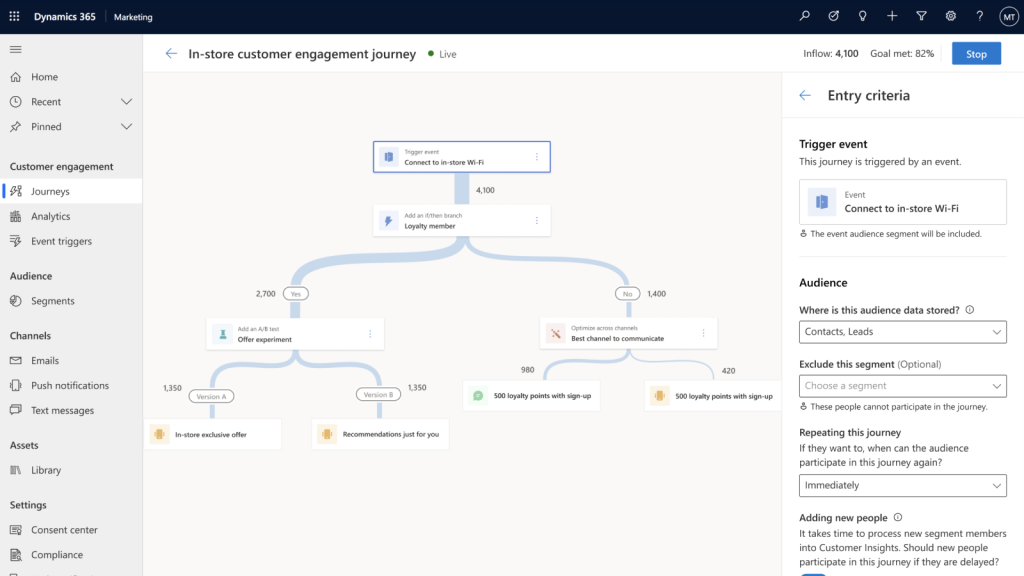
Dynamics 365 for Marketing is a leading marketing-automation application that is part of the Microsoft’s Dynamics 365 platform of business apps. It delivers comprehensive capabilities for creating and running multi-channel campaigns. The application includes event management, lead management, embedded intelligence for segment targeting, lead scoring, and interactions insights. Being built on the same platform as Dynamics 365 for Sales, your marketing and sales teams can share common information and business processes to help them collaborate closely throughout the sales cycle.
Here’s what’s new:
Create automated multichannel campaigns using the customer journey designer. Each journey establishes a target market segment and can then deliver automated communications, make automated decisions, generate internal tasks, deliver follow-up communications and respond to customer interactions.
Run high-volume email campaigns to deliver personalized messages that look great on all platforms and screen sizes. Judge the effectiveness of emailing campaigns with detailed counts of opens, clicks, forwards, etc.
Use the embedded segmentation engine to set up sophisticated, dynamic marketing segments that perfectly target your campaigns. The engine queries against a high-volume database that uses your collected behavioural, demographic, and firmographic data to find targeted prospects.
2. Rich content creation
Create modern online content, including visually rich email messages, landing pages, and forms using intuitive, graphical digital content designers. You can get to work quickly by starting with professionally designed templates, which can easily be customized and saved to help reinforce brand identity and build brand awareness.
3. A new event management module
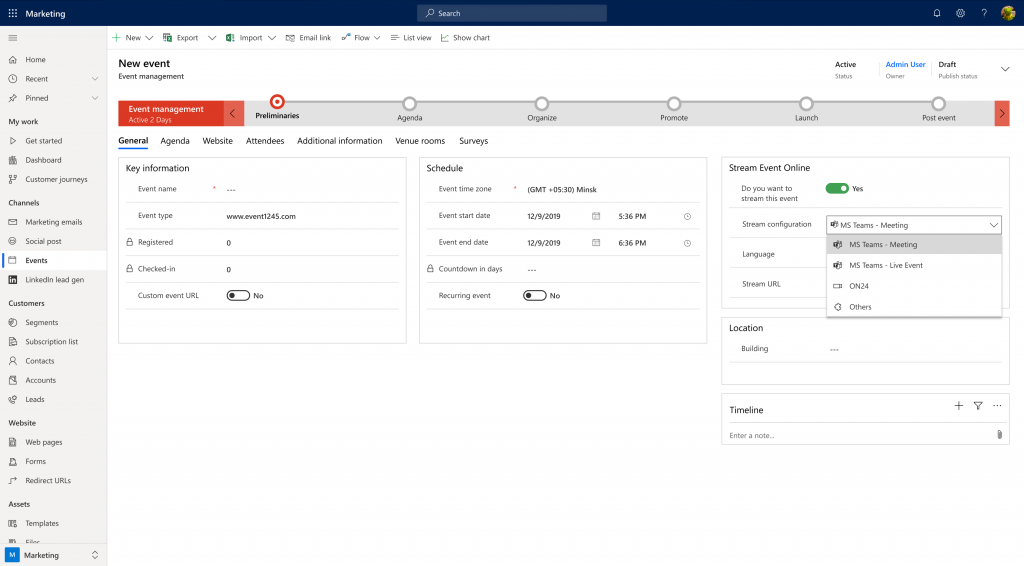
The Marketing application features comprehensive event management, which helps you plan, execute, promote, and follow-up on webinars and in-person events. Start your planning by modeling your venue, booking speakers, collecting sponsors, and setting up your event schedule. Then publish your event details directly to an event portal, where attendees can read about the event, view speaker bios, register online, and build their session schedule. Finally, set up a customer journey to promote the event, collect registrations, and follow up with attendees.
4. Improved Lead management
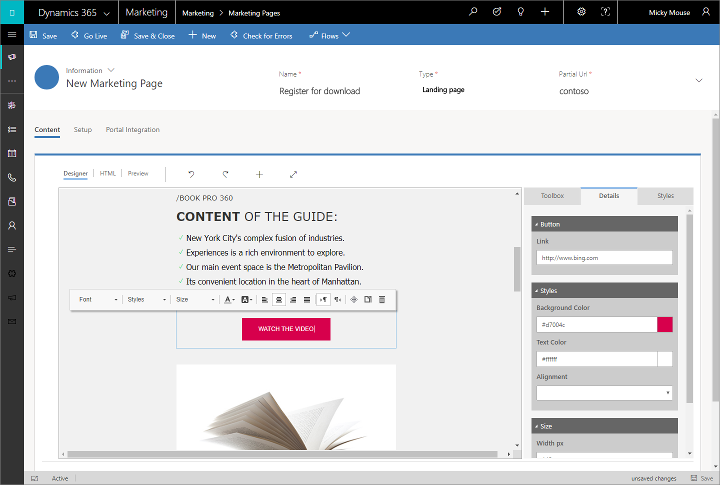
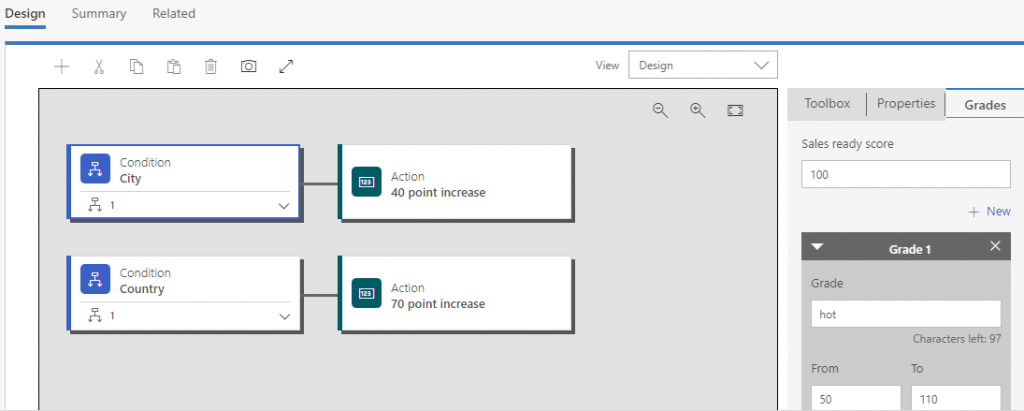
Use landing pages to invite contacts to register with your organization and generate leads based on those submissions. An automated, rule-based lead scoring engine helps identify your hottest leads as they interact with your marketing activities. The engine can then automatically forward sales-ready leads to salespeople when they reach a defined score threshold. Run lead-generation campaigns on LinkedIn and import those leads directly into Dynamics 365 for follow-up, nurturing, and qualification.
Dynamics 365 business apps share the same platform, making it possible to share data and collaborate with sales, marketing, customer service, and other business groups.
5. Embedded marketing insights
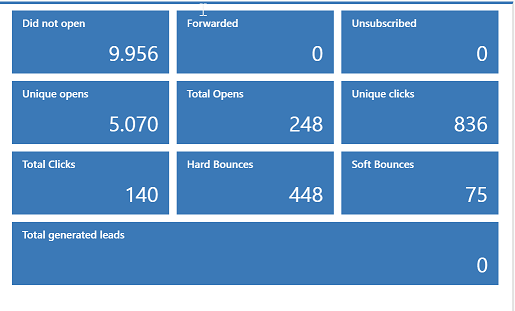
The system continuously collects customer-interaction data, keeps records of marketing activities, and holds financial details. You can view targeted analytical dashboards right in the app and explore detailed interaction records for any email, landing page, or customer journey. Generate detailed analytics with pre-made widget-based reports. Gain qualitative insights, improve decision-making, and maximize your return on marketing investment (ROMI).
Dynamics 365 for Marketing is an intelligent marketing application that will help you turn your prospects into customers. As well these features, it comes with a Microsoft Social Engagement, an application to monitor and interact with social posts and Voice of the Customer, an enterprise level customer survey tool.
Want to get more information around what a sales solution could do for you? Check out our solution’s page.
The page you requested could not be found. Try refining your search, or use the navigation above to locate the post.

Microsoft’s Dynamics 365 for Sales is a sales automation and forecasting business application that is part of the Dynamics 365 platform. It enables salespeople to build strong relationships with their customers, take actions based on insights, and close sales faster. You can keep track of your accounts and contacts, nurture your sales from lead to order, track your opportunities and forecast accurately.
Here’s what’s new in the 2018 Spring release:
Embedded intelligence (previously known as Relationship Insights) collects, manages, and analyses the diverse data and communications created throughout the sales process. It captures relevant activities and then automatically suggests the next best actions. In streamlining admin tasks, it free salespeople up to spend more time selling. Embedded intelligence has the following features:
2. Relationship analytics
Relationship analytics helps salespeople manage the opportunities pipeline by analysing relationships and presenting data and insights about the health of customer relationships. Relationship Analytics includes sentiment analysis to enhance relationship health calculations. Sentiment health analyses a range of customer interactions and signals to inform salespeople the health of their customer relationship. A simple, good, fair or poor scale is used.
3. Deeper LinkedIn Sales Navigator integration
With LinkedIn Sales Navigator integration, salespeople can tap into their professional networks and relationships to improve their pipeline.
In the Spring release, LinkedIn Sales Navigator controls have been added to forms. These give insights and help salespeople build connections as they work deals. The controls provide a full view into Sales Navigator member or company profiles, or focused views into lead icebreakers, mutual connections, and related leads, as well as account connections, recommended leads, and news.
With the LinkedIn Sales Navigator integration, salespeople now see LinkedIn profile pictures on dashboards, grids, and forms for any contact record synced with LinkedIn Sales Navigator. Seeing LinkedIn profile pictures for contacts helps salespeople build recognition of their prospects, and helps deepen connections throughout the sales process.
InMail is LinkedIn’s way of messaging people. Now with embedded InMail communication within Dynamics 365, salespeople get one-click access to people in LinkedIn.
4. Standardised Dynamics 365 Sales Reports for Power BI
Using Power BI, Sales managers can easily take Dynamics 365 data and track sales performance across products and salespeople. They can also monitor the health of their pipeline and quickly identify at-risk accounts that they may want to focus their attention on. The standard report provides key KPIs like win ratios, lead conversion rates, and year-to-date (YTD) revenue.
As well as this, entire reports can be themed with your brand colours. When you apply a report theme, all visuals in your report use the colours from your selected theme.
These Power BI reports can then be embedded back in Dynamics 365 so that all your data is in one place.
Want to get more information around what a sales solution could do for you? Check out our solution’s page.
The page you requested could not be found. Try refining your search, or use the navigation above to locate the post.
Discover More Stories

But the pressure isn’t just on contact centres. Cost cutting has meant field service agents need to see more customers per day. Project teams need to shorten the project length – with less and less personnel.
What’s needed is an intelligent, comprehensive solution. One that can increase efficiencies in the whole service division. It needs to be flexible enough to allow customers to find answers themselves, receive assistance remotely, or arrange for service personnel to come on site. And it needs to manage the process from first engagement right through to completion.
Welcome to Microsoft Dynamics 365 for Customer Service.
It’s a comprehensive way of managing every service interaction. With its incorporation of machine learning, intelligent analytics, and the Internet of Things, it will enable you to stay ahead of the competition: saving money and increasing your up-sells and cross-sells. All the while, you can ensure your staff give a consistently great experience to every customer.
Have a look at what Dynamics 365 for Customer Service could do for your company:
Not only does this enable customers to engage with you in the way they prefer, it also reduces your costs. With more people finding their own answers and logging their own service cases, you’ll need less customer service personnel.
Field Service: Dynamics 365 for Field Service is Dynamics 365’s complete field service management business app. It’s incredible. Once you have it, you’ll wonder why you ever settled for anything else. Read all about it here.
Project Service: Working alongside project management software, Dynamics 365 for Project Service Automation can manage your project costings, ensuring that your projects complete on time and on budget, and at a profit.
So, whatever your service needs, let us see how we can help you. Contact our team now…
The page you requested could not be found. Try refining your search, or use the navigation above to locate the post.
Discover More Stories

A refreshing new approach.
Unlike traditional system deployments, we’ll get your team up and running on CRM very quickly. We know that time is money. The longer a deployment takes, the longer for you to experience its benefits and get a return on your investment.
How quickly can we implement a solution? It depends on the complexity of your requirements. Simple set-ups take a single week. More complex projects: 4 weeks.

1. Our Solutions are Cloud-Based.
As well as faster deployment, we like cloud CRM because it is the securer option for your data. You can read all the reasons why we opted for cloud here.
2. Our Implementation Processes are Streamlined.
Our team have completed 100s of projects. This has enabled us to templatise a lot of the process. This doesn’t hinder us from tailoring a solution to your requirements, it just makes the tailoring process faster.
Another way we are streamlined is through carrying out early customer validation. In more traditional deployments, you’d agree on what you want up front. But the next time you gave input would be when the final product was presented to you. In our experience this only means one thing: extended project deadlines. In contrast, receiving regular customer input is the best way to ensure the project finishes on time.
On larger projects, we ensure on-going customer validation by using an agile methodology called Scrum. Scrum was developed to streamline software creation and we have adapted it for our CRM installations. It’s a process that ensures your involvement at every stage. This is extremely useful, because it allow for changes to be made during the install.
With complex deployments, customers only fully know what they need once they have seen a functioning version of the system. Scrum understands this and plans for it. When you opt to go for a CRM solution with us, it’ll be a process you’ll enjoy.
Want to see if CRM would be beneficial for you? Have a look at the business case for CRM.
The page you requested could not be found. Try refining your search, or use the navigation above to locate the post.
1985 was a big year.
Madonna and Wham! were topping the charts with their songs: ‘Like a Virgin’ and ‘Wake me up before you go-go’. Ronald Reagan was being sworn in for a second term. And Microsoft launched Excel.
Excel transformed businesses. Accountants crunched numbers and sales managers tracked their deals. It was a game changer.
“30 years later, the world’s a different place. Excel is still a great tool – just not for sales managers.”
Here’s why:
1. No single, reliable source of data
Deal information is spread everywhere making accurate forecasting almost impossible. Collaboration on complex opportunities or tenders is frustrating. And different versions of sales proposal documents are stored in multiple places. Vital information can easily be lost, but it becomes impossible to know when or where.
2. Reporting is painful and takes too long
Sales reps should be maximising selling time. Instead, they are wasting hours trying to update shared spreadsheets and collate data from different sources. Usually just before the sales meeting. That means it’s nearly impossible to have truly actionable insights.
3. Limited visibility of sales activity
Adding info to the “comments” column in Excel doesn’t reflect the true history of sales activity related to the deal. When was the last meeting? What emails have been exchanged? Are there outstanding tasks? What makes it worse is that there are no reminders for follow-up activities in the future.
4. Information isn’t mobile
No access to important customer information while on the go. Getting access to your customer’s important information right from your mobile device is painful when it lives in a shared spreadsheet. We’ve all tried accessing shared spreadsheets from a mobile device, it isn’t fun!
5. Sharing isn’t caring
Scaling a shared spreadsheet across a team creates nothing but frustration. Online and offline versions, failed attempts to save new information and corrupt files when trying to save are par for the course with shared spreadsheets.
6. Every customer is treated the same
Not all customers are created equal. Without previous purchase history on hand, prioritising deals according to their likelihood to convert isn’t possible. That means all customers and deals are treated the same, and they shouldn’t be. Spend time on the customers or prospects that really matter.
Are you stuck on Excel? Here’s how to drop the spreadsheets in 2016:
After the Microsoft Office revolution, the next revolution was CRM (Customer Relationship Management).
CRM give you secure access to a single version of the truth. With all your important customer data in one place, reports are delivered in real-time and the insights gained are instantly actionable. All activities such as email, appointments, calls and follow-up tasks can be tracked against a customer record. Keeping a comprehensive history in one place. This information is available on the go via any mobile device which means you have access to the info you need, when you need it.
Since it’s designed to scale from small teams up to tens of thousands of users, your whole team can work in CRM without anyone being locked out.
Best of all, customers can be profiled to ensure your people work on the most important deals first.
It’s simpler than you think. See it in action now:
At The CRM Team, we’re experts at streamlining your sales process.
Request a demo today. We’ll import a sample of your data and show you a different way of selling.
The page you requested could not be found. Try refining your search, or use the navigation above to locate the post.
Discover More Stories
The stats from 362 companies


The headline numbers above are average increases reported for each department. Much bigger increases are possible with full interdepartmental CRM co-ordination – something we call operational/analytical CRM.
If you do a CRM installation with us, we can get you to this operational/analytical level. It’s not something you can achieve overnight, but letting us help you makes the whole process a lot quicker. It’s something definitely worth doing. Nucleus Research estimates this unlocks a whopping four-fold increase on the benefits above.
Want the full Nucleus report? Click here
The page you requested could not be found. Try refining your search, or use the navigation above to locate the post.
Every month, more than 85 million people are more productive thanks to Microsoft Office 365. Users can work from anywhere, at any time and across any device.
Add Microsoft Dynamics 365 to your Office 365 subscription and transform the way you work with customers.
Let’s take a look at how Dynamics 365 and Office 365 work together.

Outlook & Dynamics 365
Create new Dynamics 365 records in Outlook. Never fail to track email leads again. Click one button and the email sender becomes a record in Dynamics 365. You can also bulk create records from any of your Outlook contacts.
Quick create customer tasks. Create activity lists in response to emails. Simply drag emails that need actioning into Outlook Tasks. These are automatically scheduled as tasks in Dynamics 365 and added to the customer record.
See important account info in Outlook. View account info next to the message. Dynamics 365 draws sales activities, cases and opportunity information about the account and places it next to the relevant mail.
Log your sales activities from within Outlook Calendar. With a single click from within Outlook Calendar, track meetings and customer appointments. Managers get an update on these activities without the sales rep having to log in to Dynamics 365.
Mobile. Take notes on the move. Dynamics 365 will connect these to the customer record.
Connect Excel to Dynamics 365 data at the touch of a button. If you prefer seeing reporting data within excel, Dynamics 365 will link with whatever reports you produce. The data in Excel remains linked to Dynamics 365, so your reports update dynamically. And because the data is drawn from Dynamics 365, user security roles are maintained. If the excel doc contains some data above your security clearance, that part of the data will be hidden on the spreadsheet.
Create custom dashboards. Set up all your key metrics in one window. Import datasets from Dynamics 365 with a few clicks, using the pre-built content packs. It’s never been easier to see the data you need, all in one place, on any device.
See calendars and shared docs from within Dynamics 365. Your company SharePoint accounts automatically get imported to Dynamics 365, making integration easy and seamless.
Smart collaboration on proposals. Source customer data from Dynamics 365 and those documents automatically get attached to the customer record.
Instant follow up. Conduct webinars or whiteboard discussions with Skype for Business and then immediately send a record of the event to participants. Dynamics 365 will track who received it, and add it to their customer record.
The page you requested could not be found. Try refining your search, or use the navigation above to locate the post.
Discover More Stories
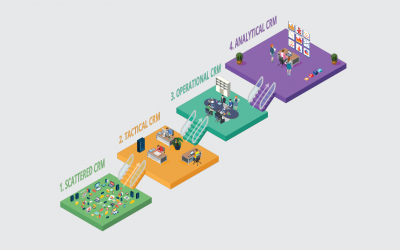
How do we know? Because each stage you reach on the CRM maturity journey directly impacts your revenue. We’ve helped companies like yours do this time and time again. Whatever stage they’ve started at.
See where you are now, and where could you be.

You may hear this in the office: ‘Nobody click save on the sales excel doc for the next 10 minutes. I don’t want another conflicted document’.
Your customer contacts are in different places. Some are in your email program, some are on business cards, some are on your phone, and some never got captured. While things seem to be functioning now, if the business grows there is no way of scaling processes.
Targeted marketing happens sporadically. When you do run a campaign, somebody has to import email addresses manually. If you outsource your marketing, you aren’t getting meaningful data back. Sales may go up after spending money on a campaign, but you don’t know which elements were the impactful ones.
You know that things ought to be better, but you are not quite sure how.

Because of this, you are wasting many hours collecting duplicate customer information. Worse still, you aren’t sure which information, in which system, is the most up to date. You wish there was a way to have a single, accurate customer record – right across your business.
You may be hearing this in your office. ‘Everyone! If you don’t send me your customer information today, they won’t be invited to the event.’
You want to be able to learn from all the data you collect, but you can’t. If you do get insights, they are only at a departmental level. They are not available to the rest of the company. And because of this, you are missing out on many up-selling and cross-selling opportunities. Your customer service could also be better.

You are beginning to be confident that a customer will get a consistent experience. Marketing, sales, fulfilment and service can all see the complete record on a customer. Not only that, you are tracking customer information across your business. Emails, calls, appointments, comments, surveys can all be seen in one place. Data from your ERP, marketing software, etc. all links up in one portal.
Every interaction is acted upon. E.g. Somebody tweets about a service issue. This gets logged by the marketing team and flagged with the service department. Because you have an over-arching system, this sort of co-ordination between departments is easy. The resultant customer experience doesn’t feel disjointed, but consistent.
You may hear this in the office: ‘Score! I just came back from the call-out and sold them a new machine!’ Because your CRM system prompts servicing engineers with upgrade opportunities, your up-sell numbers are increasing. Invoices are generated instantly. And because stock levels are accessible remotely, the customer gets realistic delivery dates.
As your system matures, you are able automate more of you processes and reporting. Staff spend more time on the things that matter and you have a better handle on what’s happening. This increased efficiency has a beneficial knock-on effect on your bottom line.

You can see the experiences a customer has in different departments. And when things go wrong, you have processes in place to intervene. When customers show certain buying patterns, promotional campaigns trigger automatically.
Accurate sales forecasting has reduced your inventory costs considerably. You are hearing things like this in your office:
‘Maximum revenue occurs when we offer these promotions, targeted at that set of customers’.
Even though your business is large, it still feels very agile. Your processes are more efficient and your opportunities are increasing. Your bottom line is improving significantly. You wonder how businesses operate in any other way.

The page you requested could not be found. Try refining your search, or use the navigation above to locate the post.
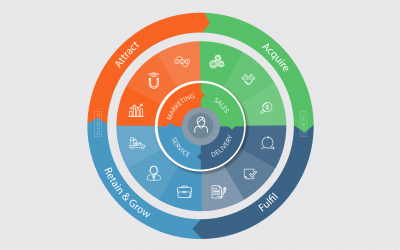
Many people think that CRM is software. But it’s far more than that.
Customer Relationship Management is about blending technology and strategy to guarantee great customer experience.
1. Marketing
2. Sales
3. Delivery
4. Service

A bitter let down
A guy in our office recently ordered a cell phone from a tele-sales company. Their marketing was excellent and they had created a strong brand that he trusted. The salesman on the phone was very knowledgeable. His easy manner made buying a simple process.
But when it came to receiving his phone, he had a different experience. On opening his package, he realised the phone was completely different to the one he ordered. When he contacted the company to correct things, nobody seemed to care. It took him a long time to get the company to deliver the phone he’d actually bought. When they eventually did, he vowed never to buy from them again.
Customers are lost through experiences like this.
It doesn’t matter how good certain teams in your business are, without consistency across the four touch points, you’ll always hemorrhage customers and revenue. This is where Customer Relationship Management comes in.
CRM gives you this consistency. A good, functioning CRM system provides great customer experience – right across your business. And because customers have a good relationship with you, you’ll be able to keep hold of them. This creates up-selling and cross-selling opportunities. Selling to current customers is far easier than attracting new ones.
Great customer relationship management doesn’t happen overnight. It’s a journey. But it’s a journey every company needs to be on.
At The CRM Team, we are experts on this journey. Whatever stage you have reached, we can assist you to get to the next one. See which stage you are at.
The page you requested could not be found. Try refining your search, or use the navigation above to locate the post.