No Results Found
The page you requested could not be found. Try refining your search, or use the navigation above to locate the post.


In place of a call from a customer for servicing or repairs – an automatic, detailed notification from the machine itself. Manual updating? Not any more: inventory changes reflect on their own, in real time. Diagnosis by a technician? How about machines that self-diagnose.
This is field service enabled by the Internet of Things futuristic, but it’s far from it. In fact, more and more organisations are beginning to adopt IoT technologies. The results are enhanced efficiency, lowered costs and the one-touch approach to business more and more customers are coming to expect.
As early as 2015, Kevin Ashton, who founded the Auto-ID Center at the Massachusetts Institute of Technology, noted at a European customer service conference that field service management was the first industry being transformed by IoT. In fact, IoT is considered by many to trace its origins precisely to field service applications.
So, what are the benefits of embedding IoT technology in a field service business? Here is some food for thought.

Your customers aren’t mechanical experts. Nor should they be. However, when something goes wrong, your customer isn’t always able to provide a clear description of the problem, or what needs to be done.
The result: delays and frustration, technicians dispatched with the wrong parts, or no need for a dispatch at all.
With IoT, however, issues are instantly clear – because reports are generated automatically by intelligent software. This means problems can be isolated instantly and addressed efficiently.
Consider the following scenario. A customer phones in because a piece of equipment has stopped working. He says that a certain part is definitely to blame. A technician is dispatched, carrying just that part. After arriving, it becomes clear that the problem lies elsewhere. Another component is needed – one the company doesn’t happen to have in stock. The customer becomes frustrated – he’s losing business every moment the machine is out of service. The technician is in an awkward position too – the best she can do is return with the right part in a few days’ time. In the interim, the customer has sought the help of a competitor.
With IoT-enabled devices, this situation never need arise.

Consider a twist on the above scenario. Ever run out of a part you could have sworn was in stock? Ever promised a customer a fix using just that part? With IoT-connected devices, this problem becomes a thing of the past, because the system sends out a signal when new parts should be ordered.
Moreover, technicians can get a view of company inventory instantly, even if they’re in the field. The result is an end to well-meaning but empty promises. It also means companies never over or under order, optimising warehousing.

IoT devices understand themselves. Meaning? They can self-diagnose, and report on their performance. By isolating specific faulty components and monitoring overall system operation, AI gets to work locating the root cause of issues being experienced.
The result is a reduced need for in-person visits by a technician, saving time and money. It also means that when a technician does need to be dispatched, the right part is always in-hand.
For many, the capabilities of IoT-enabled devices still seem a little futuristic. Moreover, a business-as-usual mindset may lead to a reluctance to change. In the unlikely event that a company has a total monopoly on the market, it’s true – there’s no need to change, as customers simply have to use that firm’s services, no matter the quality.
However, for most businesses, steep competition is a reality. Meaning: companies are always looking for ways to do things faster, better and more cheaply and turn to the providers best able to meet their needs. And if there isn’t a competitor yet, new technology is making it easier for companies to enter new markets – and quickly.
Many companies quick to adopt the new digital capabilities that began to emerge in the early 2000s reaped the rewards. That opportunity for first-mover advantage is now playing out again. Field service companies that get on board with IoT-enabled tech today may be poised to stand out from the rest of the field in a big way.
Want to find out more? Have a look at an IoT-enabled field service solution that’s tailored for you.
The page you requested could not be found. Try refining your search, or use the navigation above to locate the post.
Discover More Stories

I’m reaching out – but leads aren’t reaching back. Is it my approach? Is there another way to connect better or more meaningfully from the get-go – one I haven’t thought of?
If this feels familiar, read on.
It’s been quick, but radical. The nature of the sales game has changed – profoundly.
Gone are the days in which cold calls – or emails – could be relied upon to get you the connections you need. In fact, selling through any ‘cold’ contact is becoming more and more difficult.
Today’s sales landscape is, more and more, about one thing – trust. And not only the kind of trust that is built up over years of working together, but up-front, just-starting-out trust. And the way to get that trust going is: through relationships.
Consider this: A warm referral is four times more likely to result in a sale than a cold call.1
This is the world of relationship selling. Let’s explore it in more detail.
This is a traditional step – and still necessary. However, it’s being remade through modern CRM solutions.
With LinkedIn integration and machine learning capabilities, it’s possible to not only quickly identify who matters most, but who is most likely to buy, and how you can leverage your connections (or your colleagues’) for a warm introduction.
Then, once you’ve got a foot in the door, it becomes possible to make the most of that new connection: to find other meaningful contacts at the same company – and elsewhere, too.

We’re all inundated with digital messaging every day. In this hyper-saturated space, the only way to stand out is through relevance. By understanding a potential customer’s unique pain points and challenges – and offering them a tailored solution – you show interest and build trust.
One way to do this? Keep track of what your connections share on LinkedIn and the discussions they participate in. Have they shared particular news articles? Commented on trends? With insight into this, you’re far better to understand their specific wants and needs.

Contact a prospect or current customer when they’re overburdened with other things? At best, you’ll get silence. At worst, you’ll hurt the relationship, adding just one more pressure they need to deal with. You can leave the approach to chance or intuition, or you can get data-savvy.
How? By evaluating the health of your relationship, based on transactions, sentiment, social network messages, emails and the frequency and level of those interactions.
Predictive analytics allows you to identify not only where new business opportunities lie and which accounts to reach out to, but where potential risks for each account may lurk.

Managing many accounts – and doing it well – is tricky. Some people you interact with all the time. Others go quiet, only to make contact at an unexpected time.
When a customer feels they’ve caught you off guard or that you’re not ready to help just when they need it can mean a relationship red flag.
However, by keeping content ready to go when your customers are, you emphasise your interest and commitment. Moreover – you’re now able to tell when someone interacts with your content or if it’s been shared with other decision-makers, adding new leads to your book.

It’s easy to lose focus – or to focus on the wrong client, at the wrong time. Trying to keep track of where every customer is in the buying process is impossible without a top-down, data-driven view.
Wading through emails and correspondence doesn’t work. And it saps time. However, it’s possible to easily prioritise tasks and opportunities with the right technology. Need some guidance as to what to do next? With machine learning and analytics, that’s possible, too.
Relationship selling is remaking everything – from how connections are formed and nurtured to how they’re grown and leveraged.
Today’s always-on world of business means that impersonal, untailored contact is ignored more and more – it simply forms part of the mass of unasked-for communication we’re all faced with each day.
The solution: trust.
By leveraging your existing connections, you move from a cold caller to a known caller. Moreover, with better insight into potential customers’ pain points and needs, you’re not only
At every stage of the sales process, relationship building is coming to take centre stage.
To find out more about how you can embrace relationship selling in your sales process, check out our Microsoft sales solution.
1 http://www.nielsen.com/us/en/press-room/2015/recommendations-from-friends-remain-most-credible-form-of-advertising.html
The page you requested could not be found. Try refining your search, or use the navigation above to locate the post.
Discover More Stories

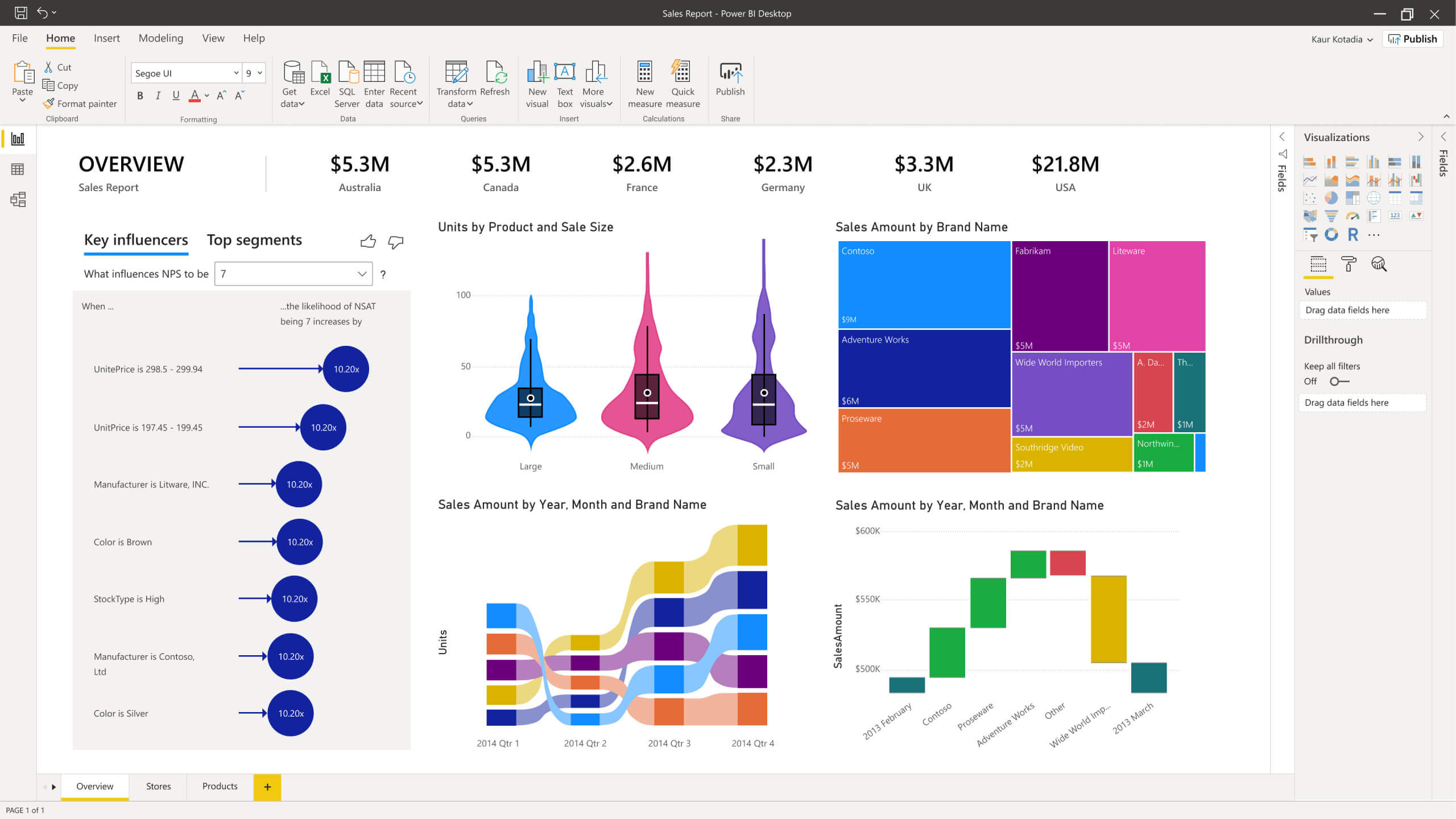
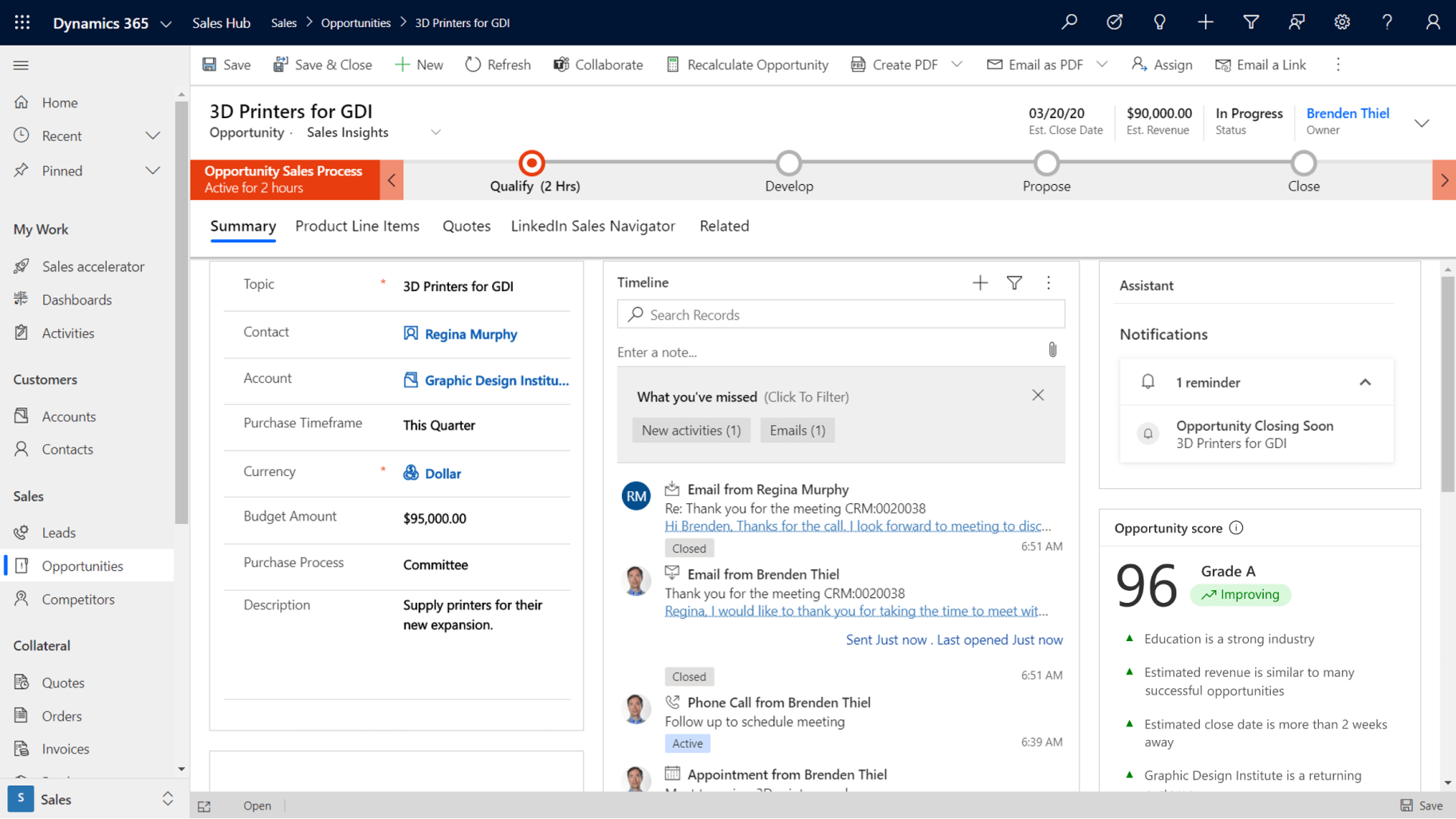
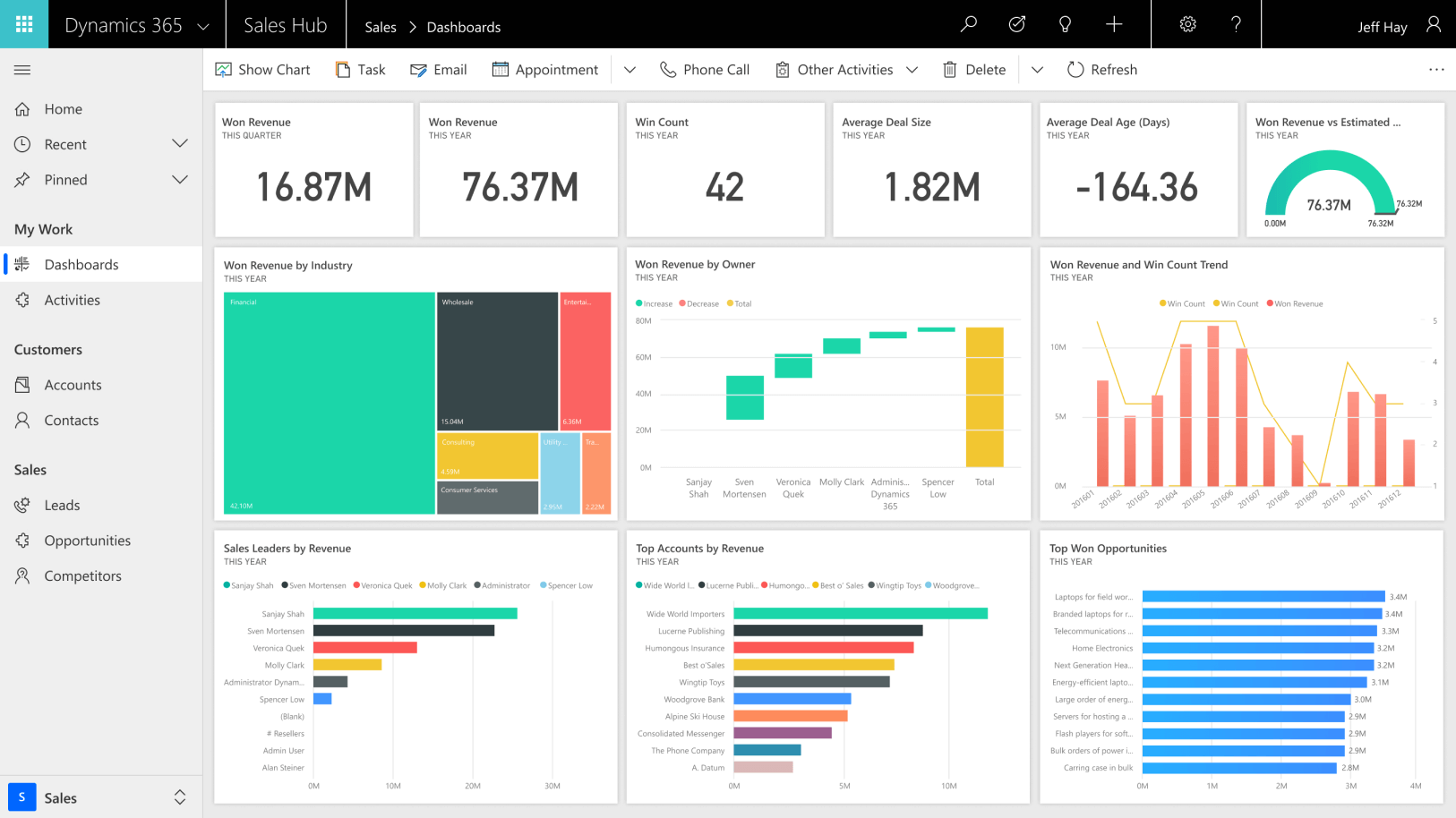
When you’re able to track your sales opportunities and keep a close eye on your pipeline, you always know when to take action to accelerate certain deals. Dashboards can provide a complete view of sales performance, allowing you to monitor close rates and see how your sales team are tracking towards their individual targets.
Admin saps critical time that could be spent on selling. By streamlining the back office, you free up time and resources that could be far better spent. The right tools allow emails, phone calls and appointments to be tracked at the click of a button. Customers and prospects can also be kept in the loop, with updates made from any device.
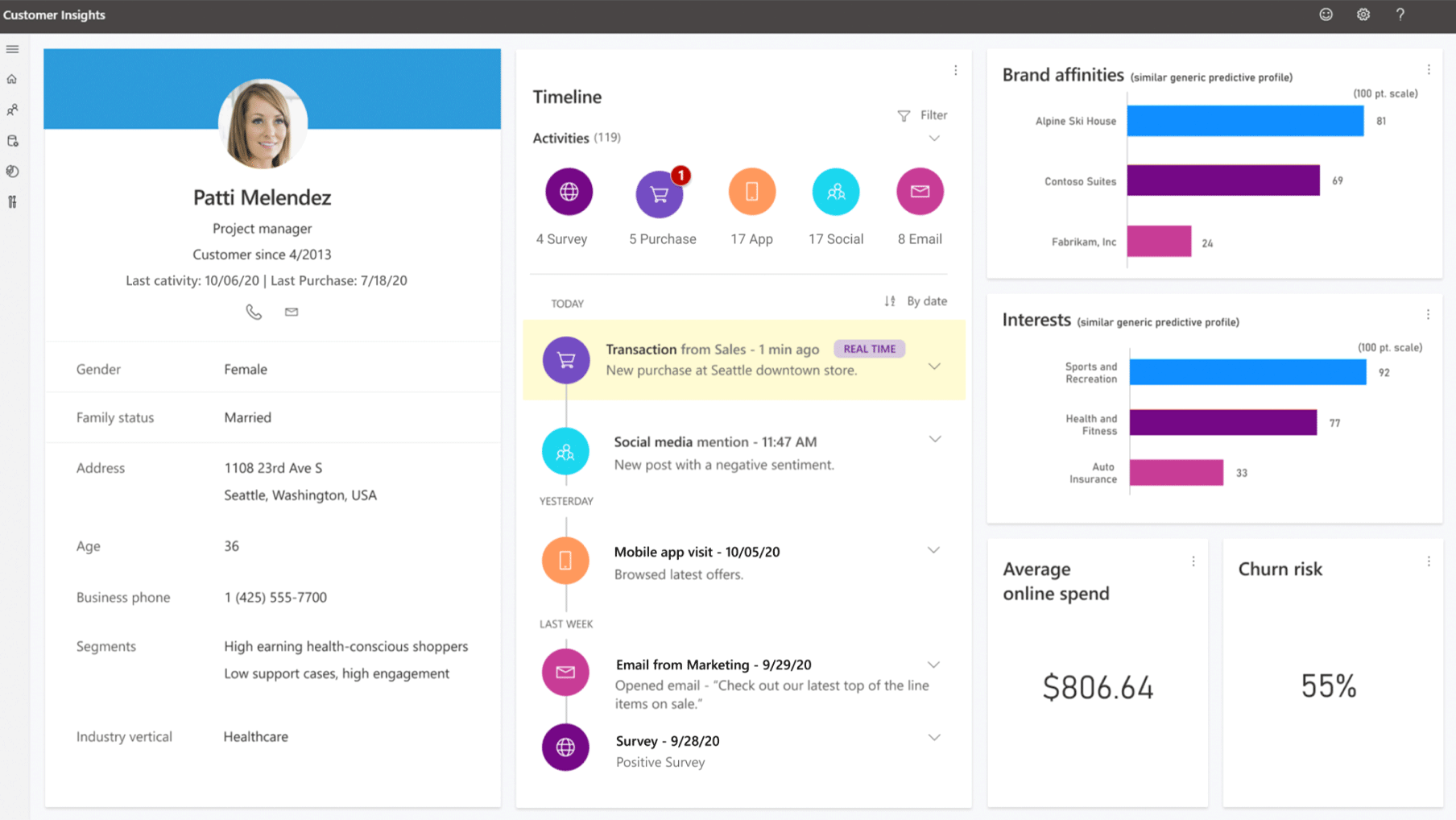
Personalisation is everything. In fact, customers have come to expect tailored interactions. With the right tools, even complex account hierarchies can be displayed in a single, simple graphic. Customer information can be shown with a history of every interaction. This allows salespeople to really connect with clients. Tailoring gets a further boost when you’re able to send targeted marketing information and shape interactions around your customers’ specific needs.
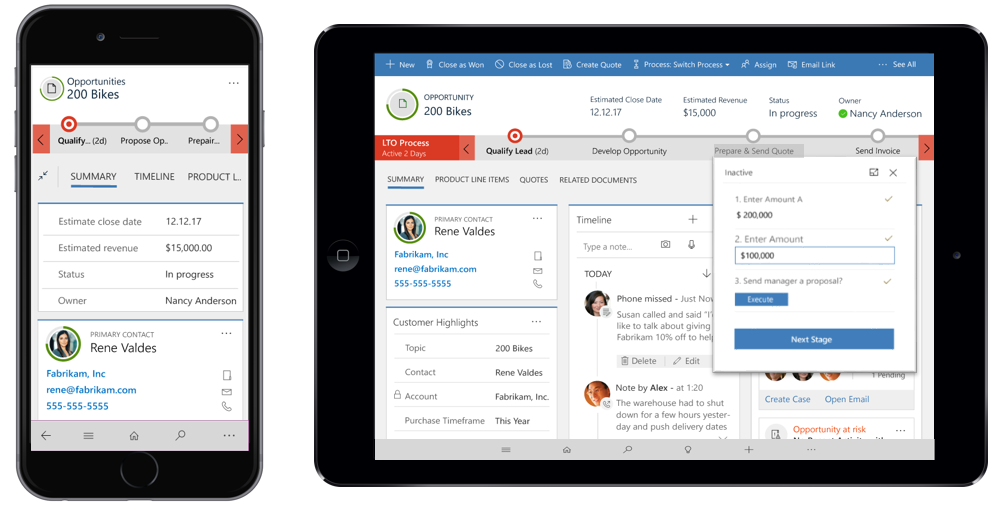
Forgetting files at the office becomes a thing of the past with mobile sales solutions. All your customer data is at your fingertips – on your phone, tablet or laptop. Better yet, new data can be automatically synced across all team members’ devices, ensuring everyone is always working with the latest information – whether you have internet access or not. Then there’s the final benefit: productivity goes up when you can work from anywhere.
When you understand your customers, you can build stronger relationships. By analysing sales data, you can learn how your customers act, turning data into key insights. Then, you can move from the big picture to the finer detail. By drilling down into underlying reports, you can see the impact of your sales efforts first hand. The ability to generate reports on salespeople, contacts or accounts on-demand can drastically reduce managerial headaches.
So – now you’ve got the low-down, here are two final pieces of the puzzle. First, your customers are often way ahead of you. Statistics show that customers are 57% of the way through the buying process before they even start talking to a supplier [1]. That means that to be – and stay – relevant, you need as much information as you can going into the sale. That information needs to be easy to understand and available at the touch of a button. Second, by increasing the time you spend on the sales process itself, you can leapfrog your competitors. According to the numbers, reps spend more than 67% of their time on non-selling activities [2]. With tools such as LinkedIn Sales Navigator and Microsoft Dynamics 365 for Sales, you can not only up the time you can spend talking to or meeting with customers, but better understand the market you’re operating in. This means the ability to offer your customers reactive, personalised service. All of the above combined can mean that critical edge over the competition.
The page you requested could not be found. Try refining your search, or use the navigation above to locate the post.
Discover More Stories

The sales and marketing funnel is all about conversion. Curious prospective buyers enter at the top and happy customers exit at the bottom.
But what happens when your funnel looks more like a sieve?
By certain estimates, as many as 8 out of 10 marketing leads fail to convert. Other stats focus on buyers’ readiness. By some calculations, only half of the leads are ready to buy.
However, by simply implementing a few intelligent, tried-and-trusted tools and techniques, it’s possible to:
Which is exactly what today’s leading companies are doing with nurture campaigns.
From generic to genius

It’s the age of the individual. Today’s customers won’t settle for generic content and messaging. They want to be met on their own terms. They want to know their custom is valued. They want to be treated as an individual. To have their unique tastes and preferences catered to.
More than this, they want to feel that the company whose products or services they’re buying is engaged and aware of how they want to be treated.
It’s a reciprocal relationship. And it’s the foundation of long-term business and repeat customers.
Building that kind of relationship takes time. It involves creating awareness. It centres on emphasising knowledge and expertise. It hinges on openness to answering questions and dispelling lingering doubts. Finally, it’s about onboarding new, quality customers likely to buy again and again.
Why you need to nurture – hint: it’s about connection

Every day, each of us is swamped with messages from companies trying to catch our attention.
Hey you, buy this!
What about you, sir? Madam? Look at this amazing product!
How can you imagine life without Product X? Product X will change everything!
What happens when we’re exposed to something over and over? Our brains begin to screen it out, so we can focus on other (more important) things.
Think about the way you stop noticing the background noise in a restaurant, so you can listen to the conversation at your own table. Or the way you forget about your breathing – until someone reminds you about it, that is.
Here’s the thing: every day, consumers are subject to the same marketing background noise. And after a while, it’s all the same, over and over, so people just filter it out.
From Noise to ‘Notice Me!’
Is there a way to craft a message that’s listened to? To be the single voice customers hear above the marketing noise?
The answer simple. Yes.
How?
Enter the nurture campaign.
It’s a journey, not a pit stop
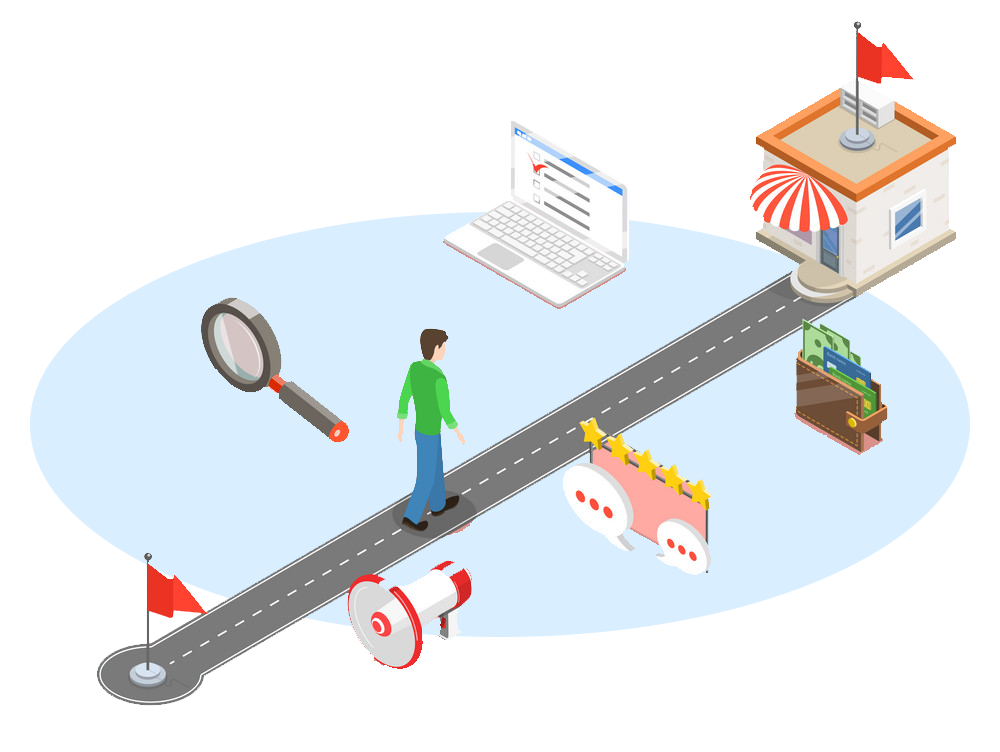
Unlike regular, once-off marketing campaigns, nurture campaigns are repeated exposures to your company and its products/services.
From establishing thought leadership to introducing positioning, the aim of a nurture campaign is to help a prospect evolve from an explorer or discoverer of company and its capabilities to a decider and finally – a buyer.
The best lead nurturing campaigns ensure that as many qualified prospects as possible end up as buyers.
How? By keeping prospective customers interested and engaged. By avoiding information overload. By making sure marketing messages are highly personalised – tailored not only to who the prospect is, but where they are in their buying journey.
How the right CRM system helps companies build amazing nurture campaigns

It all starts with prospecting and the lead. From there, it’s about qualifying and – when a buyer begins to get warm – accelerating their journey. Email and content marketing are the cornerstones, but keeping it personal is the key. Moreover, focusing efforts where they’ll yield the most returns – with intelligent lead scoring – is what it’s all about. Then there’s getting the timing just perfect – approaching prospects at a time that they’re most receptive.
The key to unlocking these capabilities is using the right technology. Managing an effective lead nurturing programme – on a massive scale – requires the right data and the right systems. Automation is critical. As is intelligence.
Dynamics 365 delivers all this and more. Find about more by seeing how our marketing solutions enable incredible, personalised lead nurturing.
The page you requested could not be found. Try refining your search, or use the navigation above to locate the post.
Discover More Stories
When forecasting – for the month, quarter or year – accuracy is everything. Boards, company management and shareholders all expect solid, reliable numbers. They’re a guide to how well the company knows itself – and how dependable its pipeline is.
At the same time, below-par projections leave no one smiling. Submit a less-than-fantastic forecast and you’ll need to explain those lacklustre numbers.
Particularly for publicly traded companies, accuracy and impressive projections are the key one-two punch. When a public company’s actuals fall even a couple of percentage points short of predictions, analysts begin to penalise, shareholders start to doubt and boards begin to grumble.
Exceeding expectations?
Of course, historic sales figures are an unavoidable benchmark. That one massive high will forever be remembered. Past performance doesn’t guarantee future returns – but it certainly sets an expectation.
However, boards and managers begin to lose trust when forecasts are consistently overstated. At the same time, understated forecasts imply a happy surprise – but a surprise nonetheless. In business, certainty rules the roost.
How do you deliver? With CRM.
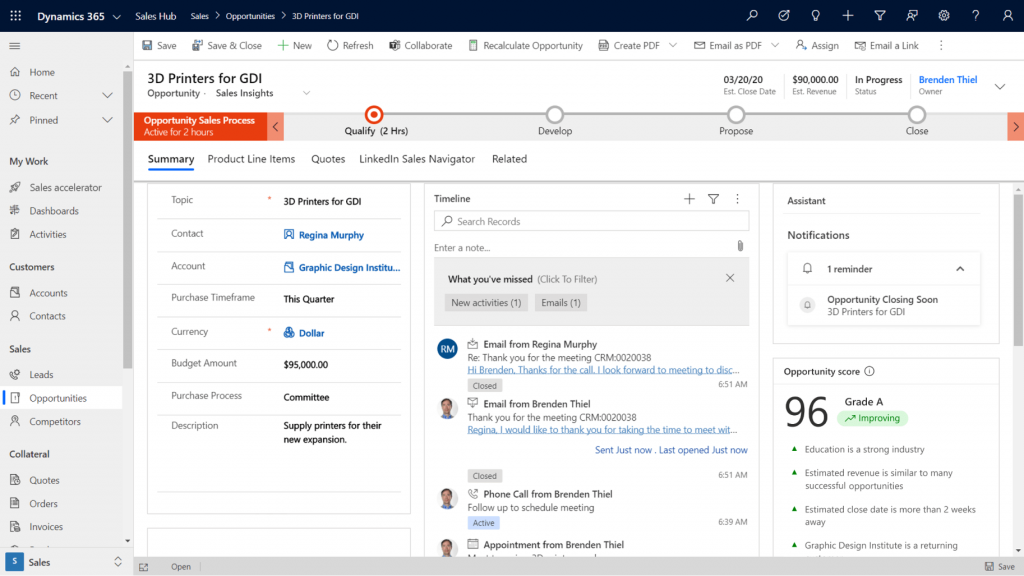
A great CRM solution makes sales forecasting easy and accurate. Gone is the guesswork. And gone are the sweaty palms that come with uncertainty.
More than this, by allowing a company to engage meaningfully and personally with customers, it’s easier to build strong client relationships with CRM. The upshot? Selling becomes easier – and sales more predictable.
At the end of the day, forecasts are not only more reliable, they’re more impressive too.
The Fantastic Forecast – Here’s how a CRM solution makes it a reality
Every moment of every day, managers need to know how sales are going. Are targets being met? Are salespeople performing at their best? Are deals in the pipeline coming to fruition – or are prospective buyers pulling out along the way?
With a good CRM, real-time analytics, critical sales information like this is available at the touch of a button. Moreover, with predictive insights, there’s a window into likely sales scenarios and deal outcomes.
Accurate as-of-right-now forecasts also allow managers to take action. By setting team goals, monitoring outcomes and providing real-time coaching, forecasts become part of an active feedback loop – they turn into a ‘live’ number. This puts an end to the black box effect. Effort in becomes measurable in results out. This equals not only stronger forecasts, but more control – and control is key for forecast accuracy.
CRM solutions give sales forecasts yet another boost. One that comes from data-based insights into how customers think. Great CRM solutions take huge volumes of information and distil it down into informative – and often surprising – insights.
How do your customers want to be engaged? Could the way you interact be more personalised? More relevant? By understanding how your customers think, and what they want, it becomes possible to better engage in future. The result: improved – and more predictable – conversion rates. Sales forecasting gets a boost on both fronts.
A final forecasting fire-up comes with speed. Fast analyses mean fast figures and fast answers. Needing to wait for the numbers slows down decisions – it may also cast doubt on them – forecasting that’s not automated is both prone to error and a major time-sapper. With at-a-glance dashboards and contextual charts providing instant insight, you boost precision, speed and trust.
No more subjectivity, no more stories
A sales director’s reputation can be made – or destroyed – by their forecasts. Often-wrong forecasts cast doubt on competence. Yet, it can be a real challenge to tease out hard reliable data from salespeoples’ subjective assessments of how things are going.
Forecast reviews often start with a story. A story about why a certain deal is a sure thing. About why another has started to fall through – inexplicably – but why the next one won’t. We’re all loaded with subjective biases. We often overestimate our abilities. We also misattribute causes and effects. Managers needing to put together an accurate team forecast out of all the subjective noise face a mammoth task.
It’s an unnecessary headache. With a Sales CRM solution like Microsoft Dynamics 365 in place, forecasting becomes rapid, accurate and automatic.
The page you requested could not be found. Try refining your search, or use the navigation above to locate the post.
Discover More Stories
Microsoft’s been innovating in analytics and business intelligence for a long time. However, Gartner’s 2018 BI and Analytics report ranked PowerBI as the no. 1 product in terms of both vision and the ability to execute. This put Microsoft ahead of 10+ niche tech firms. But it also put it well beyond the established big players, including SAP, SAS, Salesforce, Tableau and IBM.
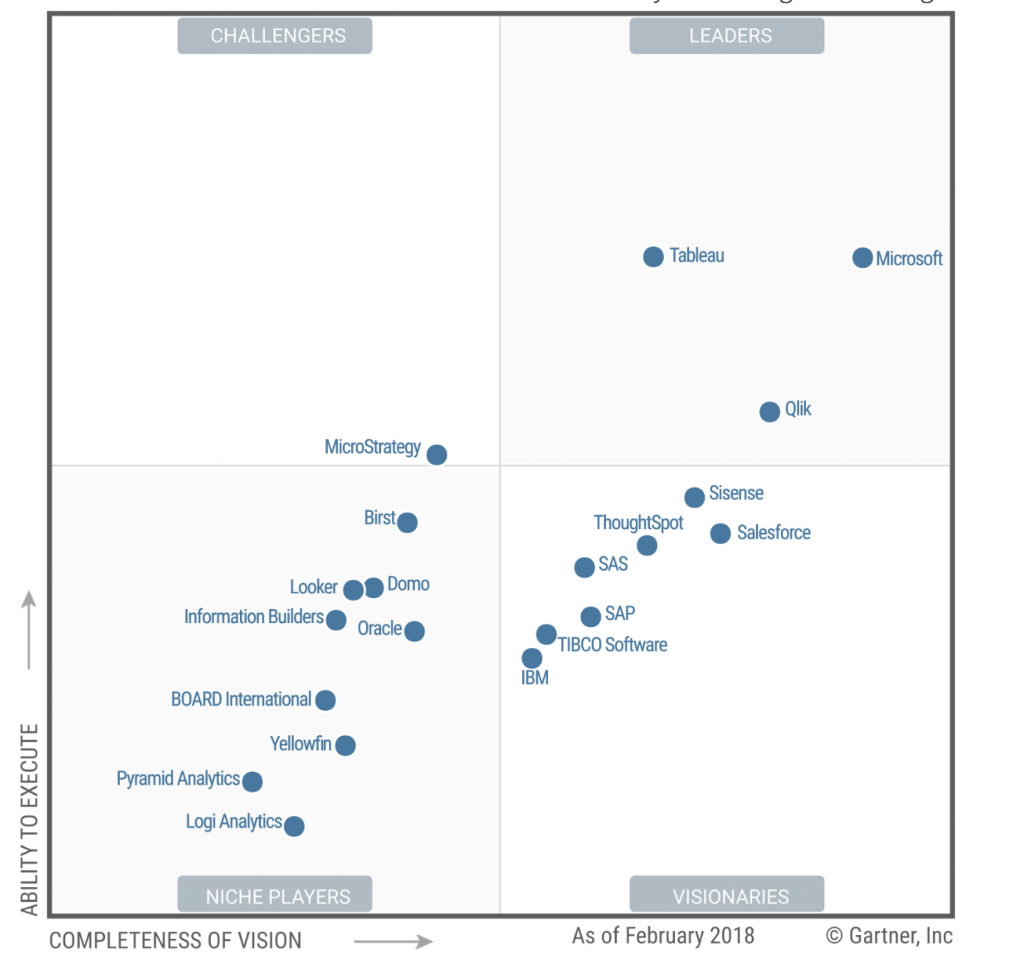
Why is this so exciting? The top spot in Gartner’s Magic Quadrant for Analytics and Business Intelligence Platforms can be claimed only by a company with huge amounts of both vision and grit. A company that can see the future – and then make it happen. For real.
It’s no big surprise. For 11 consecutive years, Microsoft has come out as a leader in the Gartner rankings. And for 3 of those, it has claimed the spot for having the most complete vision of in the BI and analytics space. All testament to the calibre of Microsoft’s global leadership and unceasing drive for innovation and excellent execution.
What is Power BI?
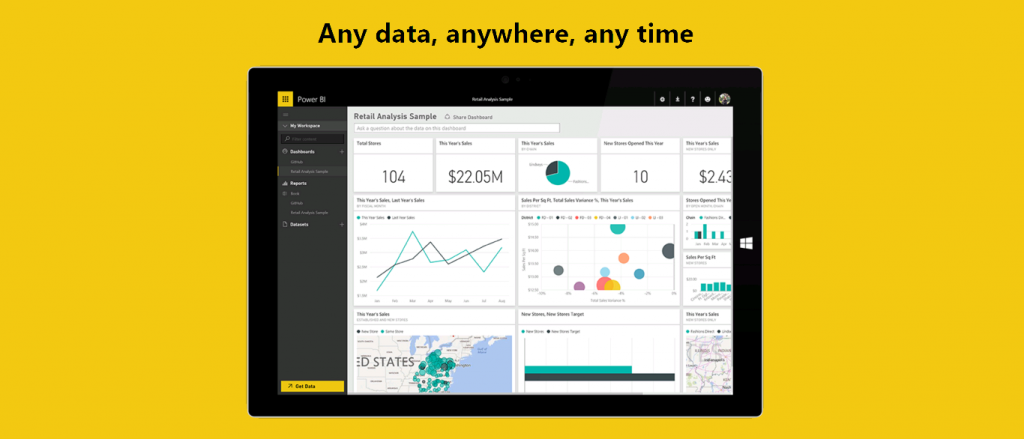
At its core, Power BI is a suite of business analytics tools to analyze data and share insights. The technology enables decision makers to monitor their business and get answers quickly with rich dashboards available on every device. It’s built on the same data model as Office 365 and Dynamics 365 so it has deep integration there, but it also has hundreds of data connectors, making it very simple to bring in your data and start giving you the insights you need.
The Magic of Microsoft
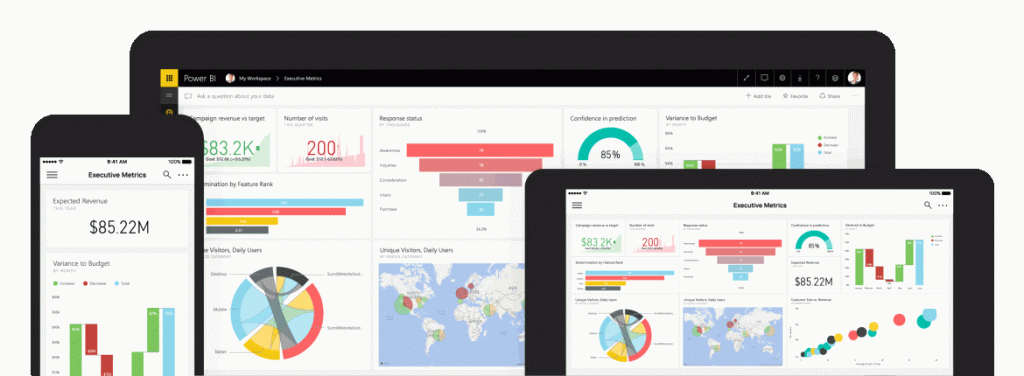
Hundreds of thousands of businesses are already plugged into Microsoft’s BI solutions. And the reasons include everything from cost-effectiveness (the professional license is only $9.99/user/mth and is often bundled in many Office 365 plans) to how comprehensive the end solution truly is.
It’s also great for multinationals with offices across the globe – Microsoft guarantees great performance and security everywhere in the world.
Check out the experiences of some of Microsoft’s major clients:
“We use Power BI in Office 365 to turn data into insights, so we can ensure our place in the future of the luxury car industry.”
– Andrew Palmer, Chief Executive Officer, Aston Martin
“With Office 365 E5, we’re delivering an intelligent workplace, where employees gain self-service access to interactive, graphical reports and dashboards through Microsoft Power BI … It’s easy to use Power BI to analyze real-time sales data and fine-tune our marketing activities to drive sales.”
– Markus Petrak, Corporate Director, Henkel
The solution is both scalable and flexible, too. Power BI allows companies to tap into architecture allowing easy and rapid integration with both Microsoft and 3rd party products. Moreover, businesses only pay for the capacity they need, meaning no wasted spend – but plenty of room to grow.
Rave Reviews
At The CRM Team, our own customers rave about the insights they receive. These insights have led to higher lead conversion, reduced customer churn and better engagement. Whenever we do a Dynamics 365 implementation we always leverage PowerBI to provide incredibly rich and relevant data visualisations. It’s such a great product and it enables us to add a lot of value to our clients.
All businesses search for that ‘edge’ over rivals. Microsoft is no different. It is determined to remain a leader and visionary in the BI platform environment. And it looks like Microsoft is getting it right – delivering modern BI and analytics solutions for a variety of users, and getting rave reviews in the process.
Why? Not only does the technology behind Power BI enable users to create and share insights in real time, but Power BI lets users create develop rich, compelling stories. These stories perfectly visualise data, allowing decision makers an at-a-glance understanding of how their business is doing. Custom visuals only add to the magic and personalisation.
What new heights Microsoft will reach from here is anyone’s guess. The company is on a rocket trajectory – who knows what tomorrow may bring?
Want to get more information what a Microsoft CRM solution could do for you? Check out our solution’s page. All of our solutions incorporate Power BI to enable incredible data visualisation and reporting.
The page you requested could not be found. Try refining your search, or use the navigation above to locate the post.
Discover More Stories

Customer service – the term calls to mind rows and rows of headset-wearing agents working through hundreds and hundreds of queries and, yes, complaints. They’re an operations director’s bugbear – running customer service can be a massive expense.
Customers do need a way to get in touch and get help. However, inefficient, people-heavy contact centres are (thankfully) on their way out. In their place are arising lean, tech-powered, data-rich powerhouses – where queries and service requests are handled seamlessly, rapidly, and at a minimum of expense.
Frustration and repetition, meet reactivity and results
The average customer service representative receives the same queries and requests over and over on any given day. Many of these are incredibly simple to resolve. A problem with how to use a product or system, for example. A service call-in. Reporting a known bug in the system.
Though each query may be quick to resolve, getting of hundreds of them on a daily basis begins to drain an agent’s time massively – and jam up the waiting queue.
There’s also the customer’s perspective to consider. For many of us, the thought of dialling into a call centre often provokes dread. Too many experiences with agents who failed to understand our problem didn’t have the right info, or couldn’t resolve the issue have meant many of us now prefer to self-serve – if we can.
Customer Service 2.0
CRM solutions like Microsoft Dynamics 365 make great self-service options a reality. But they also make interactions with agents more efficient and effective.
When it comes to customer service, every company – and customer – wants accuracy, helpfulness and speed. Closing customer service cases faster not only means happier clients – when done intelligently, it means lower costs too: less time, fewer resources.
Here’s how a CRM solution helps companies close service cases faster:

Gone are the days of customers needing to wait while agents search for the information they need – often only to find it’s not there. Good CRM solutions collate all the information your company has with its customers. That single datastore is a goldmine. With access to all the data they need, agents are enabled to provide rapid, relevant information.
With a visual interface tailored to an agent’s role, all the guidance, data and tools each agent needs are in one place. Even third-party information can be integrated.
More than this, CRM solutions allow agents to view all customer engagements – from chat to social to telephonic interactions. With every customer interaction recorded and centralised, case handover becomes seamless.

Your customers want information – and they want it fast. They’re busy. Maybe they’re tired. With scripting and intelligent recommendations, agents can follow the best route to assist customers. So they can do it faster, too. More than that, by integrating personal customer data into every interaction, agents can provide service that’s not only more efficient but more meaningful. Customers become more than just cases.
More than that, CRM solutions allow for knowledge compounding. With access to information about how other agents solved similar cases – along with forms, manuals and FAQs – the service department just gets better and better. It learns from itself.

With access to real-time insights into every case, SLA timers and entitlements, agents can make sure that service level agreements are always met.
Collaboration tools also help agents connect – both with each other and with subject matter experts. So the right answer is always at hand. If an agent’s initial answer isn’t on the mark, cases can be automatically escalated to a specialist able to solve the problem.

This is where CRM solutions really come into their own. Today, many people would rather solve their issue alone than contact an agent. CRM solutions make self-service seamless. Moreover, they keep people costs down. By leveraging searchable databases and community support options, customers are equipped to solve their issues in the way that suits them.
Live chat is a key component of the self-service revolution. Bots are a great way to engage portal and web customers. Intelligent systems guide users to the solutions and information they need. The result: customers not only feel cared for, but they no longer need to get in touch with contact centres, keeping costs – and queues – down.
The page you requested could not be found. Try refining your search, or use the navigation above to locate the post.
Discover More Stories

Sales is evolving. Predictive and powerful, it’s no longer just speed that separates the best from the rest – it’s processing power. Today’s strongest sales engines are not only blisteringly quick – thanks to A.I. they’re now intelligent.
Consider the research:
Consider a salesperson’s typical day: prioritise leads. Nurture some. Close others. Trawl customer data for new prospects. Send a follow-up email. Personalise a pitch…
At core is this: working out how best to spend the next chunk of time, when there never seems to be enough of it.
It’s a classic game of optimisation: working out how best to deploy resources – in this case time, energy and focus – in a resource-constrained environment.
So, optimisation is where it’s at. But here’s the kicker: the human brain isn’t all that good at optimising, particularly in data-dense environments.
And here’s the fixer: machines are great at it.

Given the massive amounts of data salespeople need to draw from when both searching for new leads and managing existing accounts – data covering everything from business and personal details to buying histories and account statistics – getting machines to do much of the grunt work makes sense.
And it’s why many companies have already tapped into the abilities of A.I., in turn remaking how they approach the sales process.
1. More accurate aim. A.I. is able to isolate the products, services and solutions that will best meet a specific customer’s needs with extreme accuracy. The input comes from data – a growing amount of it. Everything from internal customer records, customer interactions and a rising number of external sources yield the information needed to make suggestions and interactions more meaningful.
2. Superior speed. Real-time customer buying behaviour can be analysed by A.I. in order to refine its algorithms, meaning audience targeting stays dynamic. Moreover, admin is reduced. By automatically capturing the right data from email to populate CRM records, there’s less of a need for manual updating by sales staff.
3. Better insight. By monitoring communications to and from a customer, A.I. is able to assess the health of that relationship. This allows salespeople to put in time where it matters most. And forcus on deal most likely to close.
4. Improved prioritisation. Analysing thousands of leads is an impossible task for time-poor sales teams. AI is able to identify which lead might benefit from a follow up email, specific pitch, or relationship nurturing – cutting through the complexity.
5. Better personalisation. The interactions that produce the best results – be that in terms of deal size, increased loyalty scores or customer satisfaction – are personal, tailored and above all relevant. In the digital age, customers expect personalisation as a given. By drawing on background data, A.I. is able to make targeted recommendations.
Over the last couple of years, Microsoft has been upgrading every node in its Azure cloud platform. This multibillion-dollar investment now allows Azure to run a host of A.I., cognitive computing and neural networking-based applications.
The result is that Dynamics 365 Enterprise Edition brings together Microsoft’s customer relationship management suites and infuses the entire platform with new, advanced AI capabilities.
Two new stand-alone A.I. apps are also debuting as part of the Dynamics 365 Enterprise Edition: Customer Insights and Relationship Insights. These apps leverage the power of Azure machine learning algorithms and Cortana predicative intelligence to bring new insights to data, whether that data is in Dynamics 365 apps or Office 365.
To find out more about A.I. and supercharging your sales process, check out our Microsoft sales solution.
The page you requested could not be found. Try refining your search, or use the navigation above to locate the post.

Microsoft Dynamics 365 for Field Service works in tandem with the Dynamics 365 Customer Service application to help organizations manage field-based service teams. The Field Service app includes these capabilities:
Here’s what’s new with the 2018 Spring release:
1. New Unified Interface framework
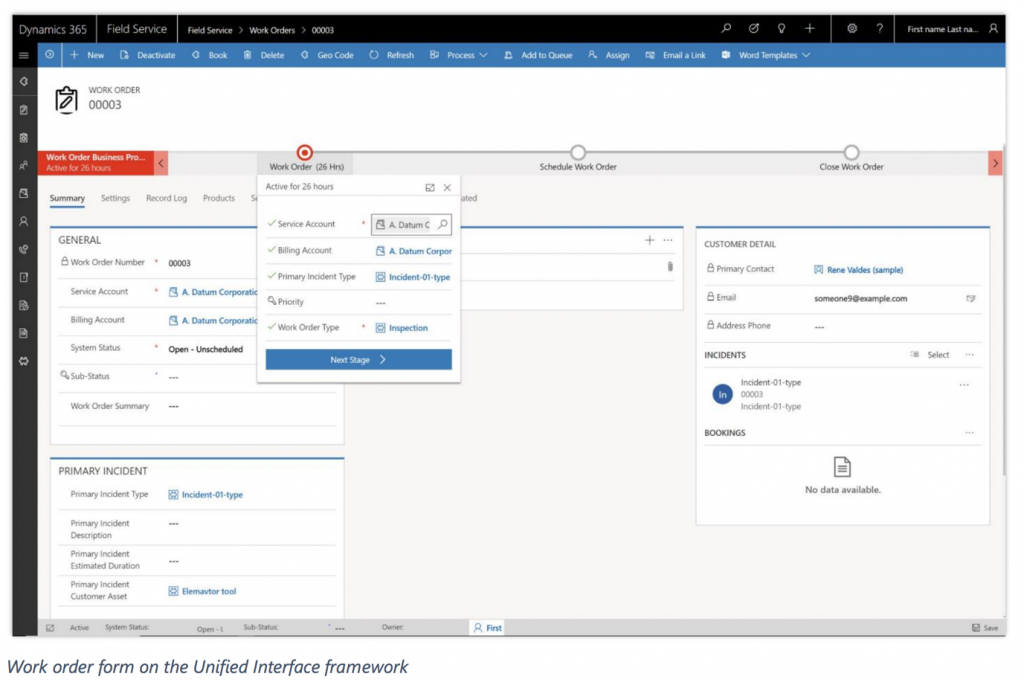
With the Spring ’18 release, the field service app is built on the Unified Interface framework for improved user experience. The app delivers a consistent, uniform user interface, and follows responsive design principles for optimal viewing on any screen size or device.
2. A Common Controls Framework (CCF)
User interface controls use a Common Controls Framework (CCF) for consistency with other Dynamics 365 business applications. Controls follow consistent, familiar patterns on every surface in the application, making it easier for field service users to be on-boarded and become productive quickly.
3. Ability to hold 3D content about customer assets
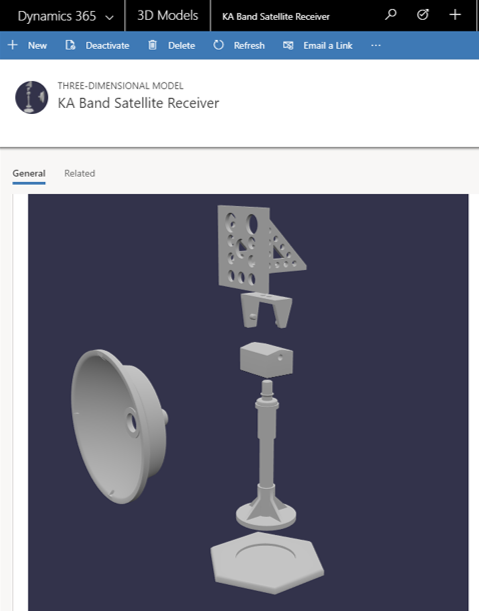
Arm your technicians with 3D content to help them complete repairs. 3D models or sequences can be uploaded (directly to Dynamics 365 or hosted externally), and then associated with customer asset records for use by technicians within the mobile app. Supported 3D file formats are glTF, FBX, GLB, and OBJ.
4. Resource Scheduling Optimization (RSO) enhancements
Resource Scheduling Optimization (RSO) is an add-on capability for the Dynamics 365 for Field Service application that enables you to automatically schedule work orders for the most appropriate resources, while simultaneously optimizing appointment setting for travel time, work hours, and many other constraints.
a. Extensible scope
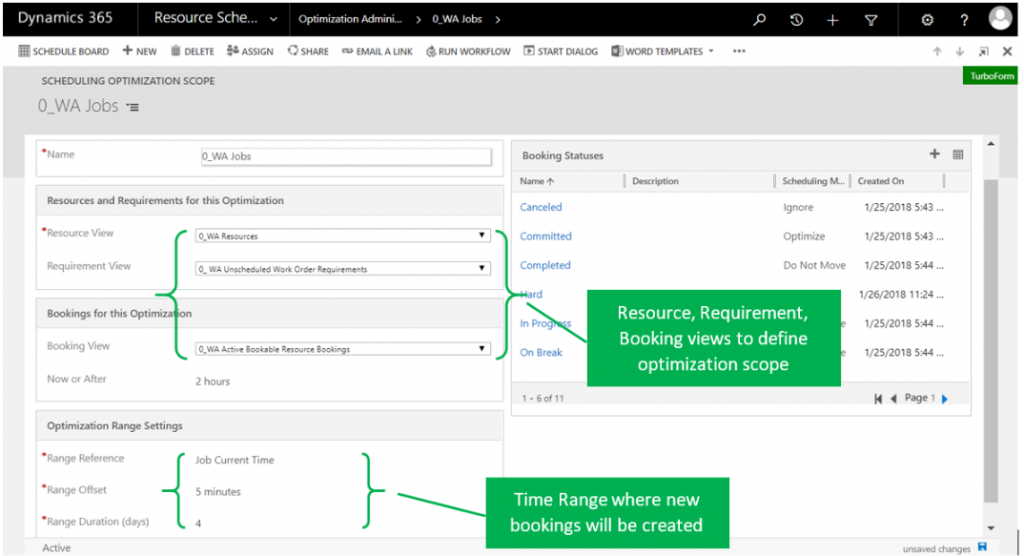
The Resource Scheduling Optimization solution uses scope to define the input for resources, resource requirements, and resource bookings, as well as the timeframes used for optimization. With extensible scope, the solution leverages entity views in Dynamics 365 to provide an easy and flexible way to define what gets optimized.
b. Run a simulation
The admin can run a schedule on demand as a simulation, which results in resource bookings that are simulations without affecting actual bookings. This capability helps an administrator better understand the effects of adjusting optimization scope, constraints, objectives, and other parameters, to determine what optimization configuration best matches business goals and objectives.
c. Enforce skill level
Resource requirements can include not only a skill, but also the level (or rating) of the skill required to do the work. By considering the skill (or resource characteristic) rating level required, the solution is able to find resources that better match required skills and proficiency.
5. Connected Field Service (IoT) enhancements
Syncing Dynamics 365 to devices and assets through the Internet of Things (IoT), Connected Field Service helps service organizations proactively detect, troubleshoot, and resolve service issues. This way a technician is dispatched only when necessary. Organizations can enable IoT alerts, device fault states, and preventive maintenance notifications to let field service managers or technicians know when to create a new case, create a work order, send commands to control customer assets remotely, prepare parts needed for a repair, or take other actions.
a. Unified Interface framework
With the Spring ’18 release, the Connected Field Service solution is built on the Unified Interface framework for improved user experience. The app delivers a consistent, uniform user interface, and follows responsive design principles for optimal viewing on any screen size or device.
b. Synchronization of device conditions and properties with device twins
Connected Field Service includes a representation of customer assets and devices that can be registered within Azure IoT Hub to enable messages to flow through Azure IoT Hub to create alerts.
In the Spring ‘18 release, in addition to receiving messages that require action, Connected Field Service uses the Azure IoT device twin capability. The device twin, which is kept in sync with physical devices, is a JSON document that holds metadata and configuration data, as well as a virtual cloud representation of physical devices.
Connected Field Service communicates with device twins to allow devices to report operating conditions such as device state, heartbeat for connectivity speed, and machine vibration. Field service operations managers gain visibility into device conditions and properties on a graphical dashboard. For example, the capacity of a tank can be monitored through IoT Hub and represented on the dashboard. When capacity reaches a threshold, an alert is sent to designated users for follow-up action.
Field service managers or technicians can also use pre-defined commands to control a piece of equipment, such as when to restart or shut down.
Want to get more information around what a sales solution could do for you? Check out our solution’s page.
The page you requested could not be found. Try refining your search, or use the navigation above to locate the post.
Discover More Stories

Dynamics 365 for Customer Service is a business application from Microsoft that is designed to empower agents to deliver fast, personalized service and support. With interactive dashboards, guided business process flows, and a timeline that delivers a unified view of customer communications, the application simplifies an agent’s job and helps increase productivity. The application is available on the web in a browser and on mobile.
Here’s what’s new in the 2018 Spring release:
1. Improved dashboards
Customer Service Hub dashboards are a one-stop workplace where agents and supervisors review their workload and take actions to resolve issues. Dashboards make it easier to review and act on information coming from various entity views and queues, and make it easier to apply additional filtering with visual, global, and timeframe filters to quickly narrow down what is most actionable and urgent.
a. Tier 1 dashboard for agents
The Tier 1 multi-stream dashboard is displayed by default. The Tier 1 dashboard is tailored to help agents deliver the initial level of support needed, and handle multiple customer issues at the same time.
b. Tier 2 dashboard for service managers or team leaders
The Tier 2 single-stream dashboard helps customer service managers and team leaders monitor more complex or escalated cases in a single view. Users can drill down in to any section and the detail they need.
2. Improved business process flows with floating and docked mode
Business process flows ensure that agents enter case data consistently and follow the same steps every time they interact with a customer. Business process flows now support floating and docked mode for process stages, which lets agents view case information and update the process stages simultaneously.
3. Timeline view of customer interactions and activities
You can now capture customer interactions and communications by adding them as activities in the timeline section of the dashboard. The timeline section presents a unified view of everything that has happened with a case, such as email received, follow-up tasks, and automatically generated system posts, plus any notes taken during customer interactions.
4. New reference panel to search for knowledge articles
The new reference panel tabs allow agents to quickly find related records, or search knowledge articles for accounts, contacts, cases, and other knowledge articles.
5. Knowledge base article editor
Author and edit well-formatted content for knowledge articles using the new rich text editor. The editor brings common word processor features like advanced styling, linking, find and replace, and insert images and tables. Search, publish, and translate knowledge articles. Preview how the knowledge articles render on different devices before publishing.
Knowledge managers and authors can monitor the status of knowledge articles using new interactive knowledge management dashboards.
Want to get more information around what a sales solution could do for you? Check out our solution’s page.
The page you requested could not be found. Try refining your search, or use the navigation above to locate the post.
Discover More Stories