No Results Found
The page you requested could not be found. Try refining your search, or use the navigation above to locate the post.
Every month, more than 85 million people are more productive thanks to Microsoft Office 365. Users can work from anywhere, at any time and across any device.
Add Microsoft Dynamics 365 to your Office 365 subscription and transform the way you work with customers.
Let’s take a look at how Dynamics 365 and Office 365 work together.

Outlook & Dynamics 365
Create new Dynamics 365 records in Outlook. Never fail to track email leads again. Click one button and the email sender becomes a record in Dynamics 365. You can also bulk create records from any of your Outlook contacts.
Quick create customer tasks. Create activity lists in response to emails. Simply drag emails that need actioning into Outlook Tasks. These are automatically scheduled as tasks in Dynamics 365 and added to the customer record.
See important account info in Outlook. View account info next to the message. Dynamics 365 draws sales activities, cases and opportunity information about the account and places it next to the relevant mail.
Log your sales activities from within Outlook Calendar. With a single click from within Outlook Calendar, track meetings and customer appointments. Managers get an update on these activities without the sales rep having to log in to Dynamics 365.
Mobile. Take notes on the move. Dynamics 365 will connect these to the customer record.
Connect Excel to Dynamics 365 data at the touch of a button. If you prefer seeing reporting data within excel, Dynamics 365 will link with whatever reports you produce. The data in Excel remains linked to Dynamics 365, so your reports update dynamically. And because the data is drawn from Dynamics 365, user security roles are maintained. If the excel doc contains some data above your security clearance, that part of the data will be hidden on the spreadsheet.
Create custom dashboards. Set up all your key metrics in one window. Import datasets from Dynamics 365 with a few clicks, using the pre-built content packs. It’s never been easier to see the data you need, all in one place, on any device.
See calendars and shared docs from within Dynamics 365. Your company SharePoint accounts automatically get imported to Dynamics 365, making integration easy and seamless.
Smart collaboration on proposals. Source customer data from Dynamics 365 and those documents automatically get attached to the customer record.
Instant follow up. Conduct webinars or whiteboard discussions with Skype for Business and then immediately send a record of the event to participants. Dynamics 365 will track who received it, and add it to their customer record.
The page you requested could not be found. Try refining your search, or use the navigation above to locate the post.
Discover More Stories
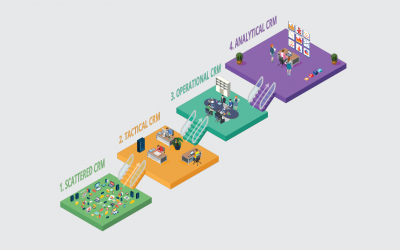
How do we know? Because each stage you reach on the CRM maturity journey directly impacts your revenue. We’ve helped companies like yours do this time and time again. Whatever stage they’ve started at.
See where you are now, and where could you be.

You may hear this in the office: ‘Nobody click save on the sales excel doc for the next 10 minutes. I don’t want another conflicted document’.
Your customer contacts are in different places. Some are in your email program, some are on business cards, some are on your phone, and some never got captured. While things seem to be functioning now, if the business grows there is no way of scaling processes.
Targeted marketing happens sporadically. When you do run a campaign, somebody has to import email addresses manually. If you outsource your marketing, you aren’t getting meaningful data back. Sales may go up after spending money on a campaign, but you don’t know which elements were the impactful ones.
You know that things ought to be better, but you are not quite sure how.

Because of this, you are wasting many hours collecting duplicate customer information. Worse still, you aren’t sure which information, in which system, is the most up to date. You wish there was a way to have a single, accurate customer record – right across your business.
You may be hearing this in your office. ‘Everyone! If you don’t send me your customer information today, they won’t be invited to the event.’
You want to be able to learn from all the data you collect, but you can’t. If you do get insights, they are only at a departmental level. They are not available to the rest of the company. And because of this, you are missing out on many up-selling and cross-selling opportunities. Your customer service could also be better.

You are beginning to be confident that a customer will get a consistent experience. Marketing, sales, fulfilment and service can all see the complete record on a customer. Not only that, you are tracking customer information across your business. Emails, calls, appointments, comments, surveys can all be seen in one place. Data from your ERP, marketing software, etc. all links up in one portal.
Every interaction is acted upon. E.g. Somebody tweets about a service issue. This gets logged by the marketing team and flagged with the service department. Because you have an over-arching system, this sort of co-ordination between departments is easy. The resultant customer experience doesn’t feel disjointed, but consistent.
You may hear this in the office: ‘Score! I just came back from the call-out and sold them a new machine!’ Because your CRM system prompts servicing engineers with upgrade opportunities, your up-sell numbers are increasing. Invoices are generated instantly. And because stock levels are accessible remotely, the customer gets realistic delivery dates.
As your system matures, you are able automate more of you processes and reporting. Staff spend more time on the things that matter and you have a better handle on what’s happening. This increased efficiency has a beneficial knock-on effect on your bottom line.

You can see the experiences a customer has in different departments. And when things go wrong, you have processes in place to intervene. When customers show certain buying patterns, promotional campaigns trigger automatically.
Accurate sales forecasting has reduced your inventory costs considerably. You are hearing things like this in your office:
‘Maximum revenue occurs when we offer these promotions, targeted at that set of customers’.
Even though your business is large, it still feels very agile. Your processes are more efficient and your opportunities are increasing. Your bottom line is improving significantly. You wonder how businesses operate in any other way.

The page you requested could not be found. Try refining your search, or use the navigation above to locate the post.
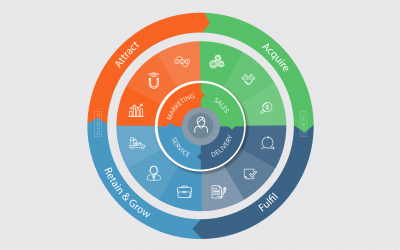
Many people think that CRM is software. But it’s far more than that.
Customer Relationship Management is about blending technology and strategy to guarantee great customer experience.
1. Marketing
2. Sales
3. Delivery
4. Service

A bitter let down
A guy in our office recently ordered a cell phone from a tele-sales company. Their marketing was excellent and they had created a strong brand that he trusted. The salesman on the phone was very knowledgeable. His easy manner made buying a simple process.
But when it came to receiving his phone, he had a different experience. On opening his package, he realised the phone was completely different to the one he ordered. When he contacted the company to correct things, nobody seemed to care. It took him a long time to get the company to deliver the phone he’d actually bought. When they eventually did, he vowed never to buy from them again.
Customers are lost through experiences like this.
It doesn’t matter how good certain teams in your business are, without consistency across the four touch points, you’ll always hemorrhage customers and revenue. This is where Customer Relationship Management comes in.
CRM gives you this consistency. A good, functioning CRM system provides great customer experience – right across your business. And because customers have a good relationship with you, you’ll be able to keep hold of them. This creates up-selling and cross-selling opportunities. Selling to current customers is far easier than attracting new ones.
Great customer relationship management doesn’t happen overnight. It’s a journey. But it’s a journey every company needs to be on.
At The CRM Team, we are experts on this journey. Whatever stage you have reached, we can assist you to get to the next one. See which stage you are at.
The page you requested could not be found. Try refining your search, or use the navigation above to locate the post.
The level of data-security that Microsoft provide is far higher than many companies can afford to provide by themselves, and it is all included in the price, taking that worry away from you.
Upgrades, maintenance, and system administration are all managed at Microsoft. This means you won’t need to spend time or energy managing a dedicated IT department or contractors when servers go down or software updates mandate a system tweak.
Because there is not a big hardware install, your capital expenditure is much lower. So you benefit from better cash flow and greater flexibility, which reduces your overall costs.
You can add or remove users as your business requires them. So short-term projects become cost-effective, because you only pay for additional license fees for the duration of the project. And as your business grows, so does Microsoft Dynamics 365. Because it can run 100,000 users concurrently, Dynamics 365 will never cap your growth.
Time is money, and with the on-premise set up being far more complex, you will get a much quicker return in your business if you opt for an online system. The online system can be installed in a day and your business can be running it at its max in a matter of weeks, meaning you’ll quickly see a meaningful return on your investment.
Wherever your company expands to you’ll find that there’ll always be a Microsoft partner proficient in Dynamics 365 nearby. This means that help or advice will never be far away. With Microsoft Dynamics 365 currently operating in 40 countries in 41 different languages, it’s truly a global product.
With the world becoming more mobile, it’s essential that everyone in your business can access information wherever they are. With Dynamics 365 you don’t even need a laptop as you can get full functionality via your tablet or even your cell phone (Android, iOS, or Windows).
You only pay for the users that are active on the system. In traditional deployments you purchase a number of licenses up front but with Dynamics 365, you can adjust what you pay according to the needs of your business. So the cost is mainly an operational cost, and only increases as your business does.
Microsoft promise a 99.9% uptime or they will give you your money back. With multiple global data centres, you don’t need to worry about glitches or bugs, or even cyber attacks, as Microsoft has this covered, leaving you to focus on your core business.
Because we care about your data, if you go with us, we’ll place your data in centres in Europe, where the strict European laws ensure that your data remains your own. In contrast, if you house your data yourself, you come under the data protection laws of the country that you reside in.
If you are looking for a fully connected system so you can focus on your business, view Microsoft Dynamics 365 here!
The page you requested could not be found. Try refining your search, or use the navigation above to locate the post.
Discover More Stories